







Professional Monitoring vs. Self-Monitoring: What’s the Real Difference?
Last updated July 30, 2026
When researching home security, the choice between professional monitoring and self monitoring is often framed as a simple feature decision. Many systems can send alerts to your phone, which makes the two options seem similar at first glance—but getting a notification isn’t the same as getting a response.
The real difference is who acts when something happens. With self monitoring, alerts go to you and you decide what to do next. With professional monitoring, a trained monitoring center receives the alarm and can review the situation and help coordinate a response.
This can make all the difference when every second counts, whether you’re asleep, traveling, or simply not looking at your phone.
What self-monitoring actually means
Self monitoring means your system sends alerts directly to you through an app, text, or push notification. From there, the responsibility shifts to you: notice the alert, check what happened, and decide whether anything needs attention.
For some households, that level of visibility may be enough. If your main goal is keeping an eye on deliveries, checking in on pets, or confirming the kids made it home from school, self monitoring can provide useful awareness without adding another service layer.
What professional monitoring changes
Professional monitoring adds a second layer of response when you’re not available. Instead of relying only on you to notice and assess an alert, the system is connected to a monitoring center that receives alarm signals and can help coordinate a response when needed.
That difference shows up in very ordinary moments:
• An alarm triggers while you’re asleep overnight
• You’re driving and can’t safely check your phone
• You’re in a meeting or on a flight
• You’re traveling or somewhere with limited service
These are the situations professional monitoring is designed for. When an alarm triggers and you’re unavailable, someone else is already positioned to receive the signal and respond.
Why video can widen the gap
It’s easy to assume cameras make self monitoring enough. Sometimes they do. But video can also make the limits of self monitoring easier to notice.
If you’re handling alerts yourself, video mainly helps you check what happened after a notification comes through. You open the app, watch the clip, and decide whether anything needs attention.
In a professionally monitored system, that same video can also help speed up assessment when an alarm triggers.
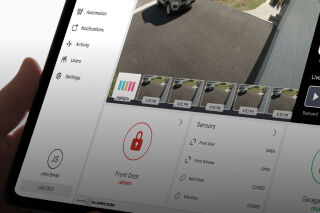
Features like Alarm Mode can bring together recent clips, live camera feeds, and system activity in one place during an alarm, helping homeowners quickly see what’s happening. Some monitored video setups can also allow operators to assess live video and use two‑way communication on supported cameras if intervention is needed.
The result is a practical difference. Instead of video only helping you figure things out after an alert, it can also help monitoring professionals quickly verify what’s happening and determine the right response.
Professional monitoring vs. self monitoring at a glance
| What Happens | Self Monitoring | Professional Monitoring |
| Alarm is triggered | Notification is sent to your phone | Alarm signal is sent to a monitoring center where trained operators receive it |
| You miss the alert | No action is taken until you see the notification | Monitoring operators review the alarm and take appropriate action |
| You need to understand what happened | You open the app and review clips or live video | Alarm activity, recent clips, and live video help operators quickly assess the situation |
| Emergency help may be needed | You decide what to do and contact help if necessary | Monitoring center can verify the event and immediately escalate for emergency response if needed |
| Day-to-day responsibility | You manage alerts and decisions yourself | Monitoring center provides ongoing oversight and response support |
Which one makes more sense for your home?
The difference becomes clearer when you think about what happens after the system sends an alert.
Self monitoring can make sense if your main goal is awareness, and you’re comfortable being the one responsible for checking alerts and deciding what to do next. For some households, that level of visibility is enough.
Professional monitoring shifts that responsibility. When an alarm triggers, the signal goes to a monitoring center where trained operators can review the event and help determine the appropriate next step.
For many homeowners, that extra layer of response is the real value: knowing the system doesn’t rely entirely on you being available in the moment.
The better question to ask
Instead of comparing feature lists, ask a simpler question: who handles the alert when you can’t?
That framing tends to cut through a lot of the marketing around security systems. Alerts and cameras are useful, but what really matters is what happens when something triggers an alarm and you’re unavailable to respond.
For help thinking through the options, connect with a local security professional who can walk you through different packages and help you decide what level of support makes sense for your home.