








How Intelligent Video Is Changing Retail Security and Store Operations
Last updated June 16th, 2026
Intelligent video helps retailers do more than review incidents after they happen. It gives businesses faster visibility into store activity, more useful alerts, and a clearer way to manage operations across one or many locations.
For retail decision-makers researching new systems, the shift is not simply from older cameras to newer cameras. It is from passive recording to connected video that supports security, store operations, and multi-location oversight from a single platform. Below, we break down what is changing, why retailers are making the switch, and what to look for when evaluating intelligent video.
Why Traditional Retail Video No Longer Covers the Full Need
Retail video is no longer just a tool for reviewing theft after the fact. For many retailers, it now plays a broader role in helping teams monitor daily activity, verify events faster, and manage multiple locations more consistently.
Today, retail businesses need visibility into questions like:
- Did each store open and close on time?
- What happened at the back door during a delivery?
- Does after-hours activity need attention?
- How can managers check several locations without relying on calls or separate systems?
- How quickly can staff find the right footage for an incident review?
This is why more businesses are moving toward intelligent video. It helps turn footage into actionable information that supports both security and day-to-day operations.
How Intelligent Video Improves Day-to-Day Retail Oversight
Intelligent video helps retailers understand activity faster, reduce manual review, and maintain more consistent oversight across stores.
In practice, that can mean:
- Identifying people and vehicles instead of generic motion
- Finding footage tied to a specific event
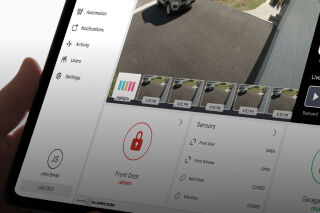
- Checking live activity from a mobile app or dashboard
- Managing multiple locations more consistently
When video is part of a unified platform, it can also connect with alarms and other system activity to provide a clearer picture of what is happening at each location.
Where Retailers Are Seeing Practical Value
For most retailers, the value of intelligent video shows up in daily operations. It helps teams verify activity faster, answer routine questions, and maintain more consistent oversight across locations.
Deliveries and stockroom activity
Back doors and stockrooms are common areas for delivery questions and access issues. Intelligent video helps retailers confirm timing, review door activity, and understand what happened during a specific window of time.
Parking areas and exterior visibility
For retailers with parking lots, loading zones, or rear entrances, exterior visibility is just as important as interior coverage. Familiar vehicle recognition can help teams distinguish expected vehicles from unknown ones and improve awareness around restricted exterior areas.
Multi-location oversight
For regional managers and facilities teams, the benefit is consistency. A unified platform makes it easier to review activity across stores, apply the same workflows at each site, and manage operations without switching between separate systems.
Unified Intelligent Video vs. Standalone Camera Systems
For retailers evaluating video systems, the biggest difference is usually not the camera alone. It is whether video is part of a unified platform that connects with the rest of the business’s security and operations, or a standalone system that has to be managed separately.
Feature | Unified Intelligent Video System | Non-Unified System |
Event review | Video linked to alarms, access activity, and other system events | Manual review of footage |
Alerts | Context‑based alerts tied to relevant activity | Generic motion notifications |
Multi-location management | Centralized visibility across multiple stores | Separate management by location |
Operational visibility | Supports openings, deliveries, after‑hours review, and incident follow‑up | Primarily used after an incident |
Response workflow | Video and related activity available in one interface | Requires switching between systems |
Scalability | Easier to standardize across locations as the business grows | Harder to expand consistently |
What to Look for When Evaluating Intelligent Video
When comparing intelligent video systems, focus on the capabilities that matter in daily operations. The right platform should help teams verify events quickly, reduce noise, and support consistent oversight across locations.
Relevant alerts
Look for alerts tied to meaningful activity, not just generic motion. This helps teams focus on events that may actually need attention.
Fast event verification
The system should make it easy to find the right footage and understand what happened without lengthy manual review.
Multi-location consistency
If you manage multiple stores, the platform should support the same visibility and workflows across every site.
Connected workflows
Video is more useful when it works alongside intrusion, access control, and other response tools in one platform.
Flexible exterior coverage
If parking lots, side entrances, or loading zones matter, look for analytics and camera options that support those areas, including vehicle-based visibility where needed.
Business activity insights
Understand how your locations are performing using data from your video system. Look for tools that can help track customer traffic, peak hours, occupancy trends, and other operational patterns that support staffing, merchandising, and business decisions.
Why Retailers Are Making the Switch
Retailers aren’t upgrading video just to capture better evidence. They want faster event verification, clearer visibility across locations, and a more efficient way to manage daily operations.
That’s the shift: intelligent video turns footage into actionable information, especially when it’s part of a connected system. Connect with a local pro to design an AI‑enabled surveillance system tailored to your business.