







What Matters Most in a Small Business Security?
Last updated August 13, 2026
A lot of small business security systems promise the same things: smart alerts, mobile apps, connected devices. But more features do not necessarily mean better security or easier day-to-day management.
The systems that make the biggest difference are usually the ones that help businesses stay aware of what’s happening, respond quickly when issues come up, and avoid unnecessary manual work in the first place. That could mean verifying an after-hours alert in seconds, managing employee access remotely, or checking whether a location opened on time without making a phone call.
Below, we break down the capabilities that matter most when comparing small business security systems and how they support both security and daily operations.
1. Unified security that makes daily management easier
A lot of security systems add complexity instead of reducing it. When alarms, cameras, locks, and alerts all operate separately, even routine tasks can turn into extra work.
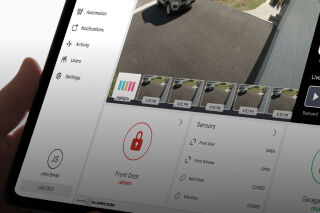
A connected platform keeps those tools in one place, making it easier to manage the business without constantly switching between systems. That might mean checking video tied to an after-hours alert, unlocking a door for a delivery, or confirming a location was armed properly at closing.
For small businesses, the real advantage is consistency. Fewer disconnected tools usually means fewer missed steps and a clearer view of what’s happening across the property.
2. Alerts to Help You Decide What Needs Attention
Most businesses do not need more notifications. They need alerts that make it easier to understand what is actually happening.
Generic motion alerts can quickly become background noise, especially during busy shifts or after hours. More useful systems add context by connecting alerts to video, door activity, and recent events so managers can verify issues faster.
For example, if a back door opens late at night, a manager should be able to immediately review related footage and recent activity instead of calling the site or searching through recordings manually. During alarm events, integrated workflows can also bring together live feeds, recent clips, and system activity in one place to support faster assessment.
3. Connected Video for Added Context During Events
A lot of businesses still think of security cameras as something you check after an incident. That is useful for reviewing what happened, but it does not help much in the moment.
Connected video systems are more useful because they help businesses verify activity as it happens. Instead of relying on a generic alert alone, managers can quickly review live or recorded footage tied to an alarm, door event, or unusual activity to decide whether something actually needs attention.
For businesses with more after-hours risk, remote video monitoring can add another layer of support. Monitoring station operators may be able to review flagged events, assess live video, and coordinate a response when needed.
4. Access Control That Adjusts as Your Business Changes
Access control tends to get more complicated as businesses grow. Employees change roles, vendors need temporary access, and old keys or shared codes can easily stay in circulation longer than they should.
A centralized access control system makes those changes easier to manage. Instead of updating permissions door by door or location by location, businesses can adjust employee access, schedules, and credentials from one platform.
That becomes especially useful for businesses managing multiple employees, shared spaces, storage areas, or locations with different operating hours.
5. Professional Monitoring to Cover the Gaps
A phone alert only helps if someone is available to see it and respond.
Professional monitoring adds backup when business owners or managers are busy, away from the property, or unavailable after hours. That can make a big difference for retail stores overnight, offices that sit empty on weekends, or businesses managing multiple locations without on-site security staff.
6. Mobile Control for Day-to-Day Business Management
Most small business owners are moving between tasks, employees, and locations throughout the day. Security systems need to support that reality instead of tying everything to an on-site keypad or office computer.
Mobile control makes it possible to manage common issues without being at the property. That might mean unlocking a door for a vendor, checking whether a store opened on time, or reviewing live video after an employee reports suspicious activity.
The real benefit is not just convenience. It is having a faster way to stay connected to the business and respond to issues without needing to be on site.
What are the core elements of small business security?
Many small business security conversations focus on devices and features. A better way to evaluate a system is to look at the core functions it actually supports.
Strong business security systems usually combine five key elements:
- Deterrence: Visible protection such as cameras, alarms, lighting, and access control
- Detection: Sensors, analytics, and alerts that identify unusual activity quickly
- Verification: Video and system activity that help confirm what happened
- Response: Professional monitoring and coordinated action when needed
- Control: Centralized management of users, doors, alerts, and locations
The most effective systems connect these elements together so businesses can respond faster and manage security more consistently day to day.
Unified Security Platforms vs. Separate Systems
A lot of small businesses end up with security systems that were added piece by piece over time. One app for cameras, another for alarms, and a separate process for managing doors or employee access.
That setup may work at first, but it often becomes harder to manage as the business grows or daily operations become more complex.
Feature | Unified Security Platform | Separate or Non-Unified Systems |
System management | Security, video, and access managed together | Separate apps and logins |
Alerts | Context tied to video and system activity | Generic notifications |
Video review | Event-based review tied to alarms and access activity | Manual footage searches |
Access control | Centralized credential management | Managed separately by door or location |
Scalability | Easier to expand as the business grows | More manual setup and administration |
A unified platform helps reduce those disconnects by bringing security, video, alerts, and access control into one system that is easier to manage day to day.
What’s the best security system for small businesses?
The best small business security systems are not just designed to react to problems after they happen. They help businesses stay connected to daily operations, verify issues faster, and manage employees, locations, and access more consistently over time.
If you are comparing options, focus on the systems like Alarm.com that make everyday management simpler, not just the ones with the longest feature list. A local security provider can help assess your business, explain available capabilities, and recommend a professionally installed system that fits the way your business operates. To find one near you, click the button below.